


AI Guidance for Teachers
What is AI and Copilot?
AI chatbots have advanced rapidly in recent years and are now widely used in professional work, with increasing adoption in education. These powerful tools can help teachers save time, work more efficiently, and enhance student learning. Several AI chatbots are now publicly available, each with unique strengths and weaknesses. Some examples include Copilot, ChatGPT, Gemini and Claude. These guidelines apply to teachers’ professional use of generative AI, including AI features within other applications.
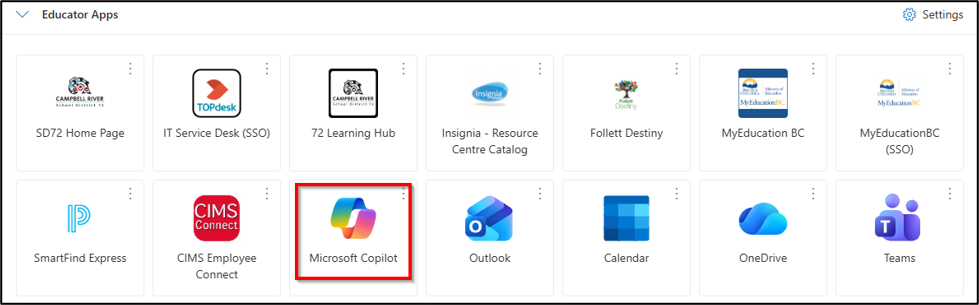
Copilot – Microsoft's AI assistant is integrated into Microsoft 365 and can be accessed from all devices with an internet connection. You can access Copilot by searching for “Copilot” online or through the SD72 Apps Dashboard.
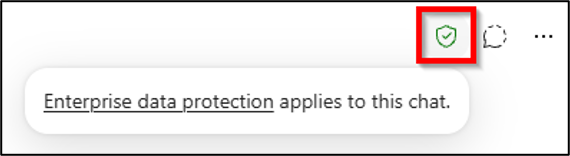
Copilot provides Enterprise Data Protection (EDP) when you sign in with your SD72 account. Look for the green shield in the top right of Copilot to confirm EDP is active. Microsoft does not use protected prompts or responses to train foundation models. Chats may be retained for district auditing and compliance.
Copilot is recommended as your default AI chatbot due to its enhanced privacy integration in SD72. Other chatbots can be explored when working with non-sensitive information.
Guidelines for Using AI Ethically and Effectively
Privacy Considerations
Protecting personal information: Do not enter personal or confidential information into AI tools (including prompts or file uploads). The only exception is Copilot when signed in with your SD72 account and Enterprise Data Protection (EDP) is active.
District Copilot: Limit personal or confidential information to what is necessary for your professional work and turn off web search when using that information. For example, teachers may use student work, marks and observations to draft feedback and report card comments. Sensitive student records (e.g., IEPs, health, counselling or disciplinary information) require separate district approval.
All AI use must comply with the Freedom of Information and Protection of Privacy Act (FIPPA) and SD72 Operational Procedure 143.
Balancing AI and Professional Judgment
AI is a powerful tool, but it does not replace professional expertise. Whether and when to use AI is a matter of professional judgment, within district guidelines.
Additionally, AI models may inherit biases from their training data and can generate incorrect or misleading information (often referred to as “hallucinations”). Teachers must review and adapt AI-generated content, verify facts and sources, and ensure it is appropriate for their students and curriculum before use.
Transparency: Be open with students and families about significant AI contributions to teaching materials, feedback or communications. Model responsible use by acknowledging AI where appropriate. Routine brainstorming or minor editing does not require a separate acknowledgement.
Environmental considerations: AI use has environmental impacts. Plan what you need before using AI and write clear, focused prompts to reduce unnecessary requests and repeated generation of content.
Using AI for Teaching Materials and Assessment
AI can help educators develop a variety of teaching materials including assignments, test questions, project ideas, and rubrics. AI can also help identify patterns in student work. Follow the privacy guidance above.
AI in Assessment and Feedback
AI may help draft formative feedback (e.g., “stars and wishes”) using teacher-selected evidence and criteria, or report card comments based on the teacher’s own assessment. While AI can provide insights into student work, it may miss critical factors such as classroom context, prior learning and individual learning needs. Teachers remain fully responsible for all assessment and must determine marks, proficiency levels and summative judgments themselves. They must review, adapt and take ownership of all AI-generated feedback, applying their professional judgment. Educators should:
- Check draft feedback against evidence of student learning before sharing it.
- Ensure assessments align with classroom instruction and student needs.
- Be prepared to justify all evaluation decisions based on professional expertise.
Academic Integrity and AI Detection
When concerns arise about the authenticity of student work, speak with the student and consider evidence of their learning through conversations, observations, drafts and demonstrations of understanding. AI detection tools (including AI chatbots) are unreliable and should not be relied upon to determine whether academic dishonesty has occurred. Follow existing school procedures.
Creating Inclusive and Culturally Responsive AI-Generated Materials
When using AI to develop teaching resources, consider these key principles:
- Universal Design for Learning (UDL): AI can help generate multiple ways to present information and engage students, but teachers must ensure materials are accessible to all learners, including those with diverse learning styles, language abilities, and accessibility needs.
- Culturally Responsive Content: AI often defaults to dominant cultural narratives. Educators should critically review content to ensure diverse perspectives, voices, and histories are accurately represented.
- Local Context and Indigenous Knowledge: AI cannot replicate the protocols and relationships that guide Indigenous knowledge sharing. Instead of relying on AI-generated content, prioritize locally developed resources and consult district-approved Indigenous education materials.
- Bias Awareness: AI inherits biases from its training data. Carefully review all content to identify and address stereotypes, inaccuracies, and missing cultural or historical contexts.


 Google Translate
