




My Education BC

MyEd Password Reset / Forgotten Password
If your password isn't working or you've forgotten it:
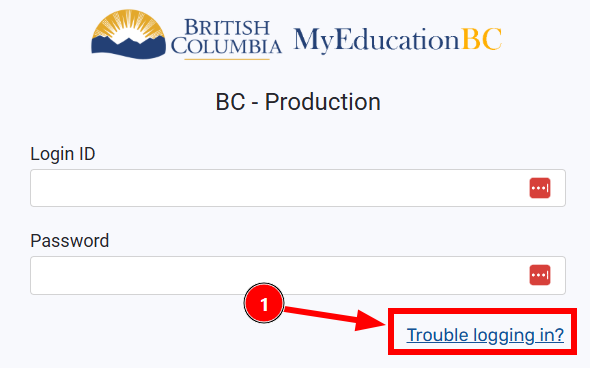
- At the MyEd website log in page, click "Trouble logging in"
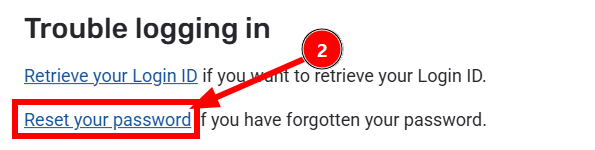
- Then click the "Reset your password" link. If you've forgotten your MyEd LoginID, click "Retrieve your Loging ID" instead and follow the instructions provided.
- Enter your Login ID, which will be something like firstnamelastname72, for example johndoe72, then click the "Recover Password" button.
- You will receive an email at your SD72 email address with a link to reset your password. Follow the instructions in that email.
 For in-depth training resources, click HERE to visit the Teacher Resource page of the My Education BC site.
My Education Reporting Instructions
To quickly access Reporting Instructions for MyEd click your grade range:
- Grades K-8,
- Grade 9, and
- Grades 10-12.
To learn about the Essentials of MyEdBC in one easy document, click Essentials of MyEdBC.pdf.
Click on the drop-down arrows to open each section for downloaded instructional sheets.


 Google Translate